
Many video editing services provide a wide array of features, but how many of these features do you actually need and use? How many of these features are just making it more difficult to find the features that you actually need, or simply driving up the price of the software? Most users only need a handful of essential tools to produce polished and engaging videos. Let’s take a look at the must-have video editing features, explain what each one does, and why it’s important for creating impactful content.
What Video Editing Features Do You Actually Need?
Of course, many different people use video editing tools for many different reasons. If you’re making an artistic film, for example, you’re likely to need more video editing features than the ones we’ve outlined here. However, if you’re a business creating promotional videos, testimonial videos, case studies, or something similar, all of these excess tools are probably just going to slow you down. Getting just the core tools that you need will help you streamline your video editing process and get your videos done faster.
1. Clipping Parts of the Video

This feature allows you to trim sections of your video to create a more concise and polished final product. Whether you need to cut out mistakes, unnecessary pauses, or irrelevant content, clipping ensures your video flows smoothly and holds the viewer’s attention. It’s an essential tool for keeping your videos engaging and within a desired runtime.
Why It’s Important: Unedited content can cause your audience to lose interest. Moreover, if you’re posting content to social media, for example, the most effective videos are concise. Clipping helps you deliver your message efficiently.
Record, store, edit, post, and request videos from your audience, all on one platform.
Try it today >
2. Adding Slides and Text
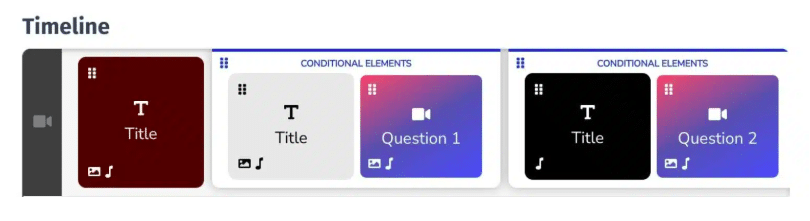
Being able to insert slides or overlay text is vital for adding context, reinforcing key points, or providing additional information. Text elements can include titles, subtitles, annotations, or even calls to action.
Why It’s Important: Text and slides enhance clarity, especially for educational or instructional videos. They can also improve accessibility for viewers who may not be able to hear the audio.
3. Adding Music
Music can transform the tone and emotion of your video, making it more engaging and professional. Most video editing tools allow you to insert background tracks or sound effects and adjust the audio levels to match your content.
Why It’s Important: Music sets the mood and keeps viewers invested. A well-chosen track can turn a simple video into a memorable experience.
4. Adding Transitions Between Scenes
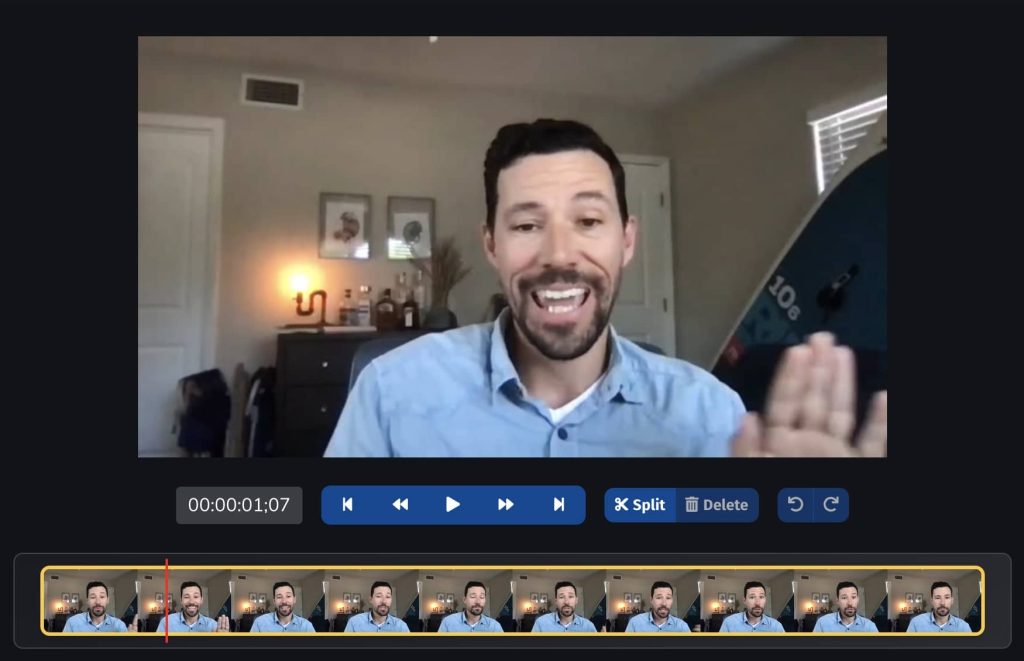
Transitions smooth the shift from one scene to the next, helping your video flow naturally. Common transition effects include fades, wipes, and dissolves.
Why It’s Important: Abrupt cuts between scenes can feel jarring to the viewer. Transitions create a seamless narrative, ensuring your content feels professional and well-constructed.
Boast provides these basic editing tools to make it easy to generate video content for your website, social media, advertisements, and more.
Give it a try today for free
5. Combining Videos
This feature allows you to merge multiple video clips into a single cohesive piece. It’s particularly useful when assembling footage shot in different locations or at different times.
Why It’s Important: Combining clips lets you tell a complete story without relying on just one continuous shot. It adds variety to your video and keeps the content visually dynamic.
Featured Resource: Creator's Guide to Collecting & Sharing Testimonials
Download the Testimonial Guide for Creators!
6. Adding Subtitles
Subtitles provide on-screen text that corresponds to the video’s spoken content. Many editing tools allow you to add and customize subtitles for style, size, and placement. This is not only important for viewers who might not be able to hear the video’s sound, but also for people who might be watching videos in public. A survey of over 5,000 US consumers by Verizon Media found that 69% watch videos with the sound off.
Why It’s Important: Subtitles make your video accessible to a wider audience, including those who are deaf or hard of hearing. They’re also helpful for viewers who prefer to watch videos without sound, such as in public spaces.
Keep It Simple for Maximum Impact
While it’s easy to be drawn to advanced features like motion tracking, 3D rendering, or color grading, these are rarely necessary for basic video editing. By focusing on these core tools you can create compelling content without getting lost in overly complex software.
When choosing a video editing tool, look for one that provides these features in a user-friendly interface. This will save you time and help you produce high-quality videos with minimal frustration. Boast provides all of these video editing features, and makes it easy to gather video content for your audience, employees, or freelance videography team. You can also post these videos to your preferred platform with just a few clicks. Start a free trial today to see how easy it is to create high-quality media content.
Boast is the only Proof-Based Marketing platform.
Join 8,000+ organizations embracing Proof-Based Marketing to build trust, improve customer relationships, and increase sales. Start collecting feedback and sharing praise in minutes.

Boast is the only Proof-Based Marketing platform.
Join 8,000+ organizations embracing Proof-Based Marketing to build trust, improve customer relationships, and increase sales. Start collecting feedback and sharing praise in minutes.
Boast is the only Proof-Based Marketing platform.
Join 8,000+ organizations embracing Proof-Based Marketing to build trust, improve customer relationships, and increase sales. Start collecting feedback and sharing praise in minutes.
Boast is the only Proof-Based Marketing platform.
Join 8,000+ organizations embracing Proof-Based Marketing to build trust, improve customer relationships, and increase sales. Start collecting feedback and sharing praise in minutes.
Boast is the only Proof-Based Marketing platform.
Join 8,000+ organizations embracing Proof-Based Marketing to build trust, improve customer relationships, and increase sales. Start collecting feedback and sharing praise in minutes.
Boast is the only Proof-Based Marketing platform.
Join 8,000+ organizations embracing Proof-Based Marketing to build trust, improve customer relationships, and increase sales. Start collecting feedback and sharing praise in minutes.
Boast is the only Proof-Based Marketing platform.
Join 8,000+ organizations embracing Proof-Based Marketing to build trust, improve customer relationships, and increase sales. Start collecting feedback and sharing praise in minutes.
Boast is the only Proof-Based Marketing platform.
Join 8,000+ organizations embracing Proof-Based Marketing to build trust, improve customer relationships, and increase sales. Start collecting feedback and sharing praise in minutes.
Boast is the only Proof-Based Marketing platform.
Join 8,000+ organizations embracing Proof-Based Marketing to build trust, improve customer relationships, and increase sales. Start collecting feedback and sharing praise in minutes.
Boast is the only Proof-Based Marketing platform.
Join 8,000+ organizations embracing Proof-Based Marketing to build trust, improve customer relationships, and increase sales. Start collecting feedback and sharing praise in minutes.
Posted in: Sales & Marketing