

Boast Knowledge Base
What is a tag? How can I add one?
How to Add Tags
Manually
- Navigate to Settings > Tags.
- Click New Tag.
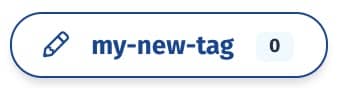
- Enter in your new tag name and click Create Tag.
If there are spaces. the spaces will be converted to dashes. - Your tag has been created! You can now tag contacts and responses with your new tag.


Automatically
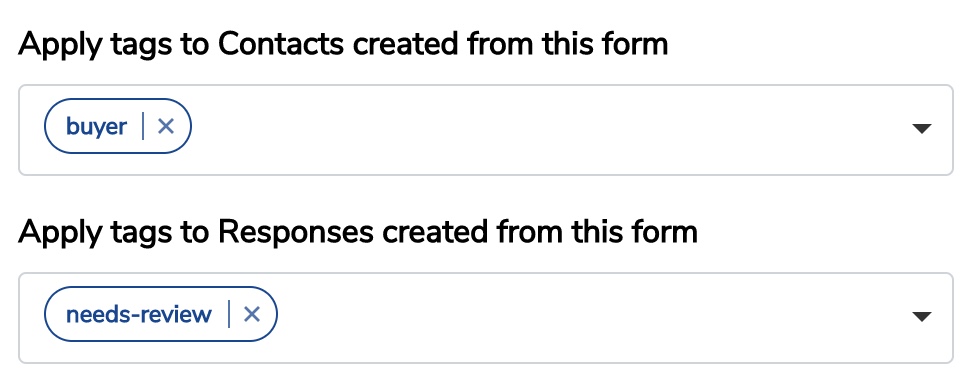
You can automatically add tags to new responses or contacts when a form is filled out.
- Go to Forms and either edit an existing form, or create a new one.
- Go to the “Settings” tab and add tags to be added to Contacts and/or Responses created from the form.
- Click “Update Form”.

How to Use Tags to Display Responses
Tags can be used to display only responses with certain tags in your display widget.
When adding or editing a widget, under Filters you'll see a field titled "Tags". Type in the tags of the responses you want to display and use the code provided to display your responses.

7 Ways to Use Tags to Display Responses
You can use tags to organize and display your responses in many different ways. Here are a few.
- Organize by product: If your company sells a wide variety of products, it's a smart idea to segment your responses by the product that is being discussed. You can then strategically place responses on each unique product page.
- Organize by service: Similar to organizing by products, if your company is service based, organizing by service is just as important. Organizing your customer responses by service will allow you to target potential customers on each individual service page with the most relevant and impactful content.
- Show different marketing channels: If your company likes to measure marketing channels regularly, using tags to automate this process is a great way to measure which avenues are most effective. For example, if you plan to collect responses on Facebook, on your website, and in person at your business, tag each accordingly to organize them.
- Collect for different events: Some companies are event based, where a lot of their business and time goes toward attending trade shows, conferences, and other business-related events. By tagging each response by event this will allow your brand to stay organized. Displaying the responses by event will also help you showcase relevant content to the right people in the future.
- Show different time frames: If your business is seasonal, or you work on different projects during different times of the year, separating responses by time frame is a great way to see trends. Tag responses by month to see which timeframe is most effective.
- Organize contest or sweepstakes submissions: If your company uses contests or sweepstakes as an incentive for customer submissions, use tags to organize those submissions. This will allow you to pick a winner from the correct pool of customers.
- Separate by office department: Most likely, your company has multiple different departments that all have a part in client communication and experience. Tagging responses by office department is a great way to separate the submissions to show off internally to your staff and externally by department on your website.
One tool with everything you need to leverage social proof to grow your business.
Meet the companies collecting video testimonials with Boast


Chicago Helicopter Experience Case Study
Chicago Helicopter Experience provides breathtaking tours of the Chicago area.

CommonSense American Case Study
CommonSense American seeks to bridge the partisan divide between everyday citizens and bring everyone to the table to make positive change.

Consulting Success Case Study
Consulting Success gives business consultants powerful strategies to win more clients and improve their overall business efficiency.

Family Chiropractic Center for Wellness Case Study
Family Chiropractic Center For Wellness provides a full range of health and wellness treatments in four convenient Florida offices.

GoForClose Case Study
GoForClose empowers real estate investors to focus on sales and closing deals by providing a specialized team and marketing platform at an affordable rate.

Growth Marketing Pro Case Study
Growth Marketing Pro helps business owners and startups develop powerful growth marketing strategies.

National Grid Case Study
National Grid is a British and US multinational electricity and gas utility company with a market cap of 47 billion dollars.

North Face Endurance Challenge Case Study
The North Face Endurance Challenge Series is a trail race series in six locations across North America.

OneTrust Home Loans Case Study
OneTrust Home Loans serves borrowers and their financing needs through an efficient, transparent, and technology-driven loan process.

Pure Energy Window Company Case Study
Pure Energy Window Company is a window installation and replacement company specializing in energy-efficient windows.

Republican Voters Against Trump Case Study
Republican Voters Against Trump seeks to cross political lines by collecting and displaying testimonial videos from self-identifying Republican voters who don’t support Donald Trump.

Savvy + Co Real Estate Case Study
Savvy + Co Real Estate is a full-service real estate firm serving clients in Charlotte, North Carolina

Sedera Case Study
Inspired by the modern sharing economy, Sedera centers on Member-to-Member sharing, basically people helping people.

Seth Godin Case Study
Seth Godin is a marketing expert promoting books and other resources.

Sonic Relief Case Study
Sonic Relief™ provides personal therapeutic ultrasound devices for pain management.

Vivir al Máximo Case Study
Vivir al Máximo sells different online courses to help students create a life on their own terms.
Who Uses Boast?
Boast was originally designed to help B2B companies improve their processes for collecting testimonials and showcasing them on their websites, but it didn’t take long to realize that the Boast apps have far more potential. Check out some of the ways people are using below.

Agencies
Boast assists growth-focused agencies with an all-in-one platform to collect, manage, and share video testimonials.

Real Estate
Realtors make it or break it by cultivating quality, genuine customer testimonials. Boast offers a way for Realtors to capture meaningful client relationships and build new ones.

Health & Wellness
Boast helps health and wellness product brands, software companies, service providers, and coaches leverage video testimonials and customer reviews to increase sales.

Software Companies
Boast helps software companies collect feedback from customers to improve product features and increase sales.

Creators & Consultants
Boast offers a simplified testimonial process so you can build a library of social proof to showcase on your website, social media, and ads.

Non-profit, Association & Advocacy
Boast helps non-profit, association, and advocacy organizations set up feedback campaigns to get a pulse on their community.

Financial Services
Boast offers everything you need to build a library of praise to showcase on your website, social media, and ads.

Coaches & Consultants
Request and collect video testimonials for your coaching business to improve credibility with your audience and sell more.